Multisenzor
First step
Download latest release.
there will be a screenshots of release here
Second step
Then, unzip it (e.g. using WinRar or 7zip). You should see some files and folders
there will be a screenshot of some files and folders
Third step
Locate file named ESP_OS_NODE_STABLE.ino.
Open it with Arduino IDE, here you will need to change something
there will be a screenshot of something
After doing that, select your ESP/NodeMCU from board list and COM ports and just click Upload to upload the code.
there will be a screenshot of upload button
Fourth step
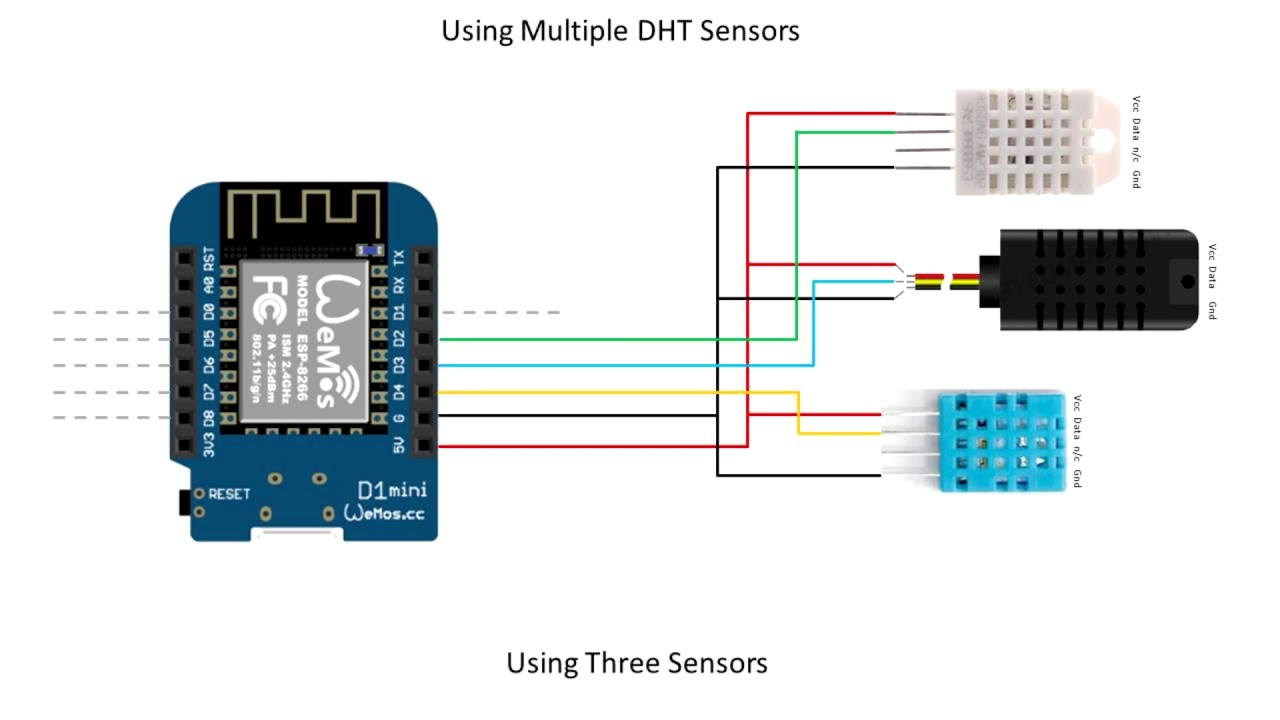
Connect your sensors (e.g. DHT11, LDR etc.) to your board.
Example diagram of connecting multiple sensors:
If you need more help with that you can always message us at our  .
.
After doing all above steps, you can plug-in your board and open Arduino IDE Serial Monitor to check if everything is working correctly.
With that all done your board is ready to send data to your Smart_Home web server.
If you need help with that, read Creating web server Wiki.